
Download Hemingway Editor – Concise Writing, Style Improvement Tool
Overview
Hemingway Editor stands out in a crowded market of writing assistants by focusing on the craft of clear, direct prose rather than just correcting spelling or grammar. Designed for writers, bloggers, students, and professionals who want their ideas to land with maximum impact, the tool highlights sentences that are overly complex, words that are unnecessarily dense, and instances of passive voice that can dilute the power of a statement. Each type of issue is color‑coded: yellow for hard‑to‑read sentences, red for very hard‑to-read passages, green for passive constructions, and purple for adverbs that could be trimmed.
This visual approach trains users to spot weak spots instantly, encouraging a habit of concise writing that carries over to any document, email, or social media post. While it does not replace a full‑featured grammar checker, Hemingway’s strength lies in its ability to teach writers how to convey thoughts in a straightforward manner, making every paragraph more readable and persuasive. Whether you are polishing a novel draft, preparing a business report, or simply trying to write a cleaner email, Hemingway Editor offers a free, web‑based interface that works without registration, ensuring a secure and distraction‑free environment for honing your style.
Key Features of Hemingway Editor
- Readability Grading: Instantly assigns a readability score based on U.S. grade‑level standards, helping you gauge the audience suitability of your text.
- Color‑Coded Highlights: Uses four distinct colors to flag complex sentences, passive voice, adverb overuse, and hard‑to‑read phrases, making revision a visual process.
- Sentence Simplification: Provides suggestions to break long sentences into shorter ones, improving flow without sacrificing meaning.
- Word Choice Recommendations: Highlights unnecessarily complex words and offers simpler alternatives to keep the writing crisp.
- Passive Voice Detector: Marks passive constructions in green, encouraging active voice for stronger, more engaging sentences.
- Adverb and Weak Verb Alerts: Detects overused adverbs and weak verb forms, prompting you to replace them with more vivid language.
- Export Options: Allows you to copy the edited text directly or export it as a plain .txt file for seamless integration into other tools.
- Offline Desktop App: A downloadable version for Windows and macOS lets you work without an internet connection, keeping your drafts secure.
- Free Web Version: No registration or payment required for the online editor, making it instantly accessible from any browser.
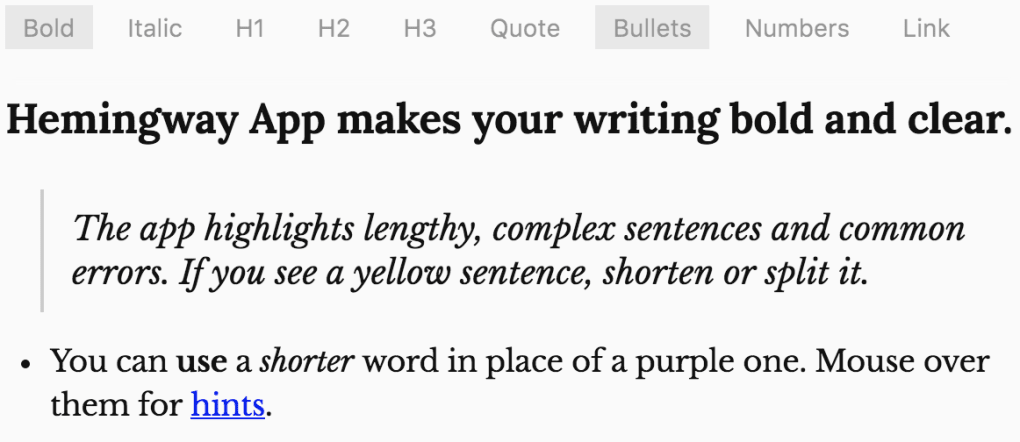
- Focus Mode: A distraction‑free writing view that hides all toolbars, letting you concentrate solely on the content.
These features combine to create an environment where writers can see exactly where their prose deviates from the clear, bold style Ernest Hemingway championed. The tool’s emphasis on readability over mere correctness encourages a mindset shift: instead of asking “Is this sentence grammatically correct?” you start asking, “Will my reader understand this instantly?” This philosophical approach is why many content creators consider Hemingway Editor a complementary partner to traditional grammar checkers, rather than a replacement.
Installation & Usage Instructions
Getting started with Hemingway Editor is intentionally straightforward. For users who prefer a cloud‑based solution, simply navigate to hemingwayapp.com. The homepage presents a clean text box labeled “Write or paste your text here.” Paste your draft, and the editor immediately begins analyzing each sentence, applying its color‑coded system in real time. No sign‑up, no download, and no hidden fees are required to begin polishing your prose.
If you need offline access or prefer to work within a desktop environment, click the “Download for Windows” or “Download for macOS” button located at the bottom of the homepage. The installer file is typically under 10 MB, ensuring a quick download even on slower connections. Once the installer runs, follow the standard OS prompts: accept the license agreement, choose an installation folder (the default works for most users), and click “Install.” After installation, launch the app from your start menu or applications folder.
Using the desktop version mirrors the web experience. Paste or type directly into the main window, and the same highlight system appears. One added benefit is the ability to work without an internet connection, which some writers find essential for confidentiality or when traveling. The desktop app also supports drag‑and‑drop of .txt files, automatically loading the content for analysis.
To make the most of Hemingway’s suggestions, adopt a systematic workflow: first, scan the document for red highlights (very hard‑to‑read sentences). Rewrite these by splitting them into two or more shorter sentences. Next, address yellow highlights by simplifying phrasing or substituting shorter synonyms. Green highlights (passive voice) should be re‑phrased into active constructions, while purple adverb alerts can often be removed entirely or replaced with stronger verbs. After each pass, re‑run the analysis to ensure the changes have improved the readability score.
For frequent users, the “Export” button at the bottom of the interface allows you to save the edited version as a plain text file, preserving all formatting for later import into word processors or publishing platforms. Remember to regularly click “Save” if you are working in the web version, as the editor does not auto‑save drafts. By following these steps, you’ll be able to harness Hemingway Editor’s power efficiently, whether you’re polishing a blog post, drafting a press release, or refining a novel manuscript.
Compatibility, System Requirements, and Pros & Cons
Hemingway Editor is designed to be accessible across multiple platforms. The web version runs in any modern browser, including Chrome, Firefox, Safari, and Edge, on Windows, macOS, Linux, and even Chrome OS. The downloadable desktop app is officially supported on Windows 10 (or later) and macOS 10.13 (High Sierra) or newer. Because the software is lightweight, it requires minimal system resources: roughly 50 MB of RAM and less than 100 MB of disk space for the desktop installation. No additional libraries or runtime environments are needed, making it a hassle‑free addition to any workstation.
Pros
- Intuitive color‑coded interface that makes problem areas instantly visible.
- Free web version with no registration required, ensuring quick access.
- Desktop app provides offline capability for secure, on‑the‑go editing.
- Readability grading helps writers target specific audience levels.
- Focus mode eliminates distractions, promoting deep work.
Cons
- Lacks advanced grammar checking and spell‑check features found in tools like Grammarly.
- No built‑in plagiarism detection or citation management.
- Export options are limited to plain text; no direct export to Word or PDF.
- Desktop app is not available for Linux, though the web version works fine.
- Free version does not include collaborative editing features.
Overall, Hemingway Editor excels at what it sets out to do: teach writers how to be concise, clear, and compelling. Its minimalistic design and focus on readability make it an ideal companion for anyone looking to improve the style of their writing without being overwhelmed by a flood of grammatical suggestions. While it may not replace a comprehensive editing suite, its strengths lie in fostering better habits that carry over to any written communication.
Frequently Asked Questions
Is Hemingway Editor completely free to use?
Yes, the online version of Hemingway Editor is free and does not require any registration. The downloadable desktop app is a one‑time purchase, but a free trial is also available for users who want to test the offline features before committing.
Can Hemingway Editor check spelling errors?
Hemingway focuses primarily on readability and style, so it does not provide a dedicated spell‑check function. For spelling, you can use your operating system’s built‑in checker or run the text through a separate tool like Grammarly.
Does the desktop app work on Linux?
There is currently no native Linux version of the Hemingway desktop app. However, Linux users can still access the full feature set through the web version using any modern browser.
How does the readability grade translate to my audience?
The grade level indicates the minimum U.S. school grade a reader would need to understand the text comfortably. For example, a grade‑8 score suggests that most high‑school readers will find the content easy to follow, while a grade‑12 score may be more appropriate for professional or academic audiences.
Can I collaborate with others directly in Hemingway?
Collaboration features are not built into Hemingway Editor. To work with teammates, share the plain‑text file or copy the content into a collaborative platform such as Google Docs, then run the text through Hemingway for final style polishing.
Conclusion – Take Control of Your Writing Today
Hemingway Editor offers a uniquely focused approach to writing improvement, emphasizing clarity, brevity, and readability over mere grammatical correctness. By providing instant visual feedback and a simple, distraction‑free workspace, it empowers writers of all skill levels to produce stronger, more engaging content. Whether you choose the free web version for quick edits or the paid desktop app for offline work, the tool delivers consistent value that can transform the way you communicate.
Ready to make your prose as sharp as a razor? Download Hemingway Editor now and start rewriting with confidence. Experience the satisfaction of seeing complex sentences turn into crisp, powerful statements—and watch your readers respond with greater attention and understanding.







